
Dawnton
V2EX  ›  macOS

macOS Catalina 怎样关闭‘连接此 iPhone 时自动同步’?

  •  
  •   Dawnton · Dec 25, 2019 · 4644 views
    This topic created in 2357 days ago, the information mentioned may be changed or developed.

    今天把 iPhone 连到我的 mac 上的时候,发现 macOS 升级到 Catalina 后把 iPhone 的文件管理放到了‘访达’里,但是一连上手机就开始自动同步,关了也没用,再插上手机或者重新打开‘访达’,还是会自动勾上,有没有人知道该怎么解决啊???
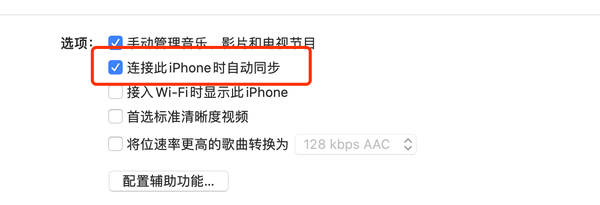
    问题如下

    2 replies    2019-12-25 19:33:57 +08:00
    zhouweiluan
        1
    zhouweiluan  
       Dec 25, 2019   ❤️ 1
    取消勾选之后,你得点右下角的「应用」确认更改
    Dawnton
        2
    Dawnton  
    OP
       Dec 25, 2019
    @zhouweiluan 非常感谢,解决了我的一大心病,哈哈哈
    About   ·   Help   ·   Advertise   ·   Blog   ·   API   ·   FAQ   ·   Solana   ·   2193 Online   Highest 6679   ·     Select Language
    创意工作者们的社区
    World is powered by solitude
    VERSION: 3.9.8.5 · 29ms · UTC 16:12 · PVG 00:12 · LAX 09:12 · JFK 12:12
    ♥ Do have faith in what you're doing.